

Setup on Bot Platform
Section titled “Setup on Bot Platform”- Login to Bot platform
- Select channel menu
- Create webchat channel with enabled secure webchat
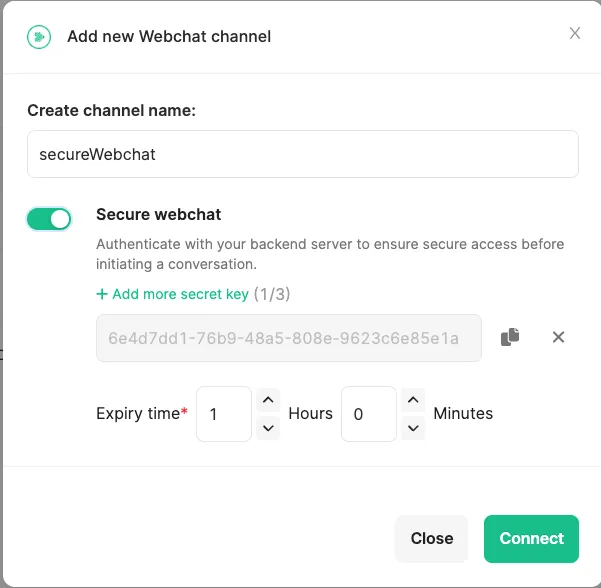
Setup on Client BE code
Section titled “Setup on Client BE code”- Generate
authTokenwith API,/token/authand it will return authToken (one time use).
curl --location 'https://webchat.amitysolutions.com/token/auth' \--header 'Content-Type: application/json' \--data '{ "channelId": "channelId", // channelId in channel Setting "token": "userId1", // userId that we normally put in html "serverKey": "secretKey" // one of valid serverKey in channel Setting}'- Use authToken to generate accessToken with API, /token/access and it will return accessToken.
curl --location 'https://webchat.amitysolutions.com/token/access' \--header 'Content-Type: application/json' \--data '{ "authToken": "authToken"}'- Insert the accessToken into the SDK configuration to initiate the chat. Steps 1 and 2 will be handled by the customer’s backend. For example, Website A has its own authentication system. Their customers log in to their website, and the backend needs to execute Steps 1 and 2 to obtain an access token, then initiate the Webchat session using this access token.
<!DOCTYPE html><html lang="en">  <head>    <meta charset="UTF-8" />    <meta http-equiv="X-UA-Compatible" content="IE=edge" />    <meta name="viewport" content="width=device-width, initial-scale=1.0" />    <title>Customer website</title>  </head>  <style>    /* check breakpoint */    @media (max-width: 1366px) {      #ams_sdk-frame-container {        width: 100% !important;        height: 100% !important;        bottom: 0px !important;        right: 0px !important;        border-radius: 0px !important;      }      #ams_sdk-frame-content-header {        border-radius: 0px !important;      }    }  </style>
  <body></body>
  <script type="text/javascript">    const DESKTOP_ENDPOINT =      "https://webchat-sdk.staging.amitysolutions.com/sdk/ams_sdk.js";    (function (d, t) {      var v = d.createElement(t),        s = d.getElementsByTagName(t)[0];      v.onload = function () {        const reload = window.ams_sdk.chat.load({          channelId: "channelId", //required          mode: "bubble", //required          cssLinks: ["http://127.0.0.1:5500/style.css"],          displayName: "displayName",          token: "token",          placeholder: {            ready: "Type a message...",            unAuthorized: "Unauthorized",          },          secure: {            enabled: true,            accessToken:              "accessToken",          },          imageUrl:            "https://static.wikia.nocookie.net/b8ebd9b1-6590-433e-b23d-28108708220f",          botImage:            "https://i.ibb.co/0jZzQYH/Screen-Shot-2021-08-31-at-11-18-20-AM.png",          botName: "QQQQQ",          bubble: {            //Edit size of chat widget icon            button: {              style: `
                background: green;                border-radius: 100%;                border: none;                width: 100px;                height: 100px;                bottom: 200px;                right: 200px;              `,              //Edit image of chat widget icon              image: {                style: `                  width: 100%;                  height: 100%;                `,                url: "https://assets-global.website-files.com/5eddccffdb3c6a27f79757c1/5eeb0be6ba225a23e09b0a80_amity-logo.svg",              },            },
            frameContainer: {              width: "500px", // width of frame container              height: "500px", // height of frame container              style: `              right: 0px              `,
              header: {                title: {                  text: "Amity Chat",                  style: `                    color: #000;                    font-size: 20px;                    font-weight: bold;                  `,                },                style: `                  background: blue;                  height: 50px;                `,              },            },          },          richmenuSetting: {            fixedHeight: 200, //px if add this divided by will not effect            // dividedBy: 5, // formular of this is window.innerWidth (100% width of iframe) / 1.666666666666666666666666666 / dividedBy          },        });        document.getElementById("reload-btn").addEventListener("click", () => {          reload("newtoken", {});        });      };      v.src = DESKTOP_ENDPOINT;      v.type = "text/javascript";      s.parentNode.insertBefore(v, s);    })(document, "script");  </script></html>
Was this page helpful?
Thank you for your feedback!