

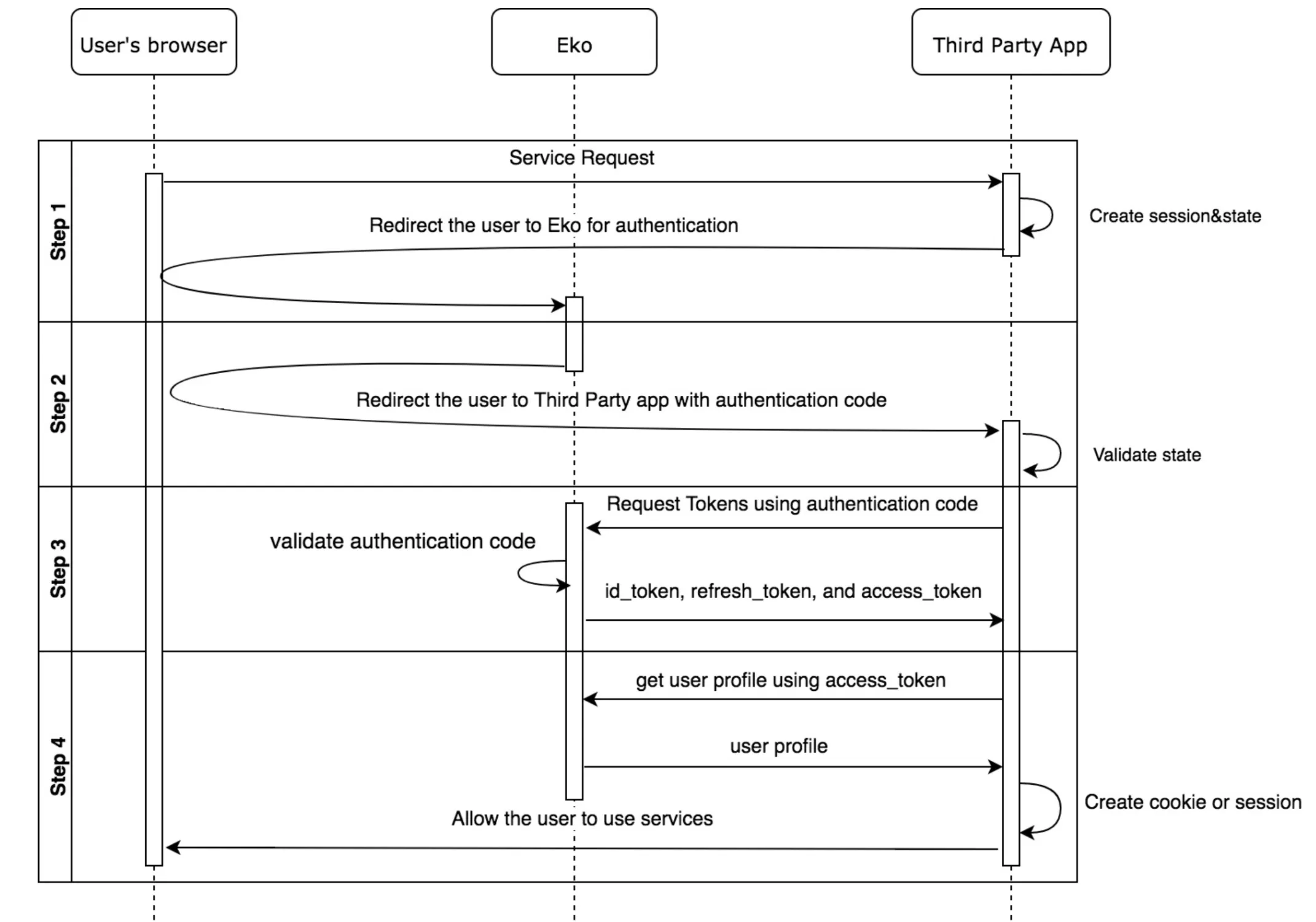
Eko OpenID authentication conforms to OpenID Connect 1.0. The flow can be broken down into 4 steps including:
- Step 1 - Redirect users to authenticate to Eko
- Step 2 - Obtain authentication code from Eko
- Step 3- Request tokens using authentication code
- Step 4- Get user profile using access token (optional)
Step 1 - Redirect users to authenticate to Eko
Section titled “Step 1 - Redirect users to authenticate to Eko”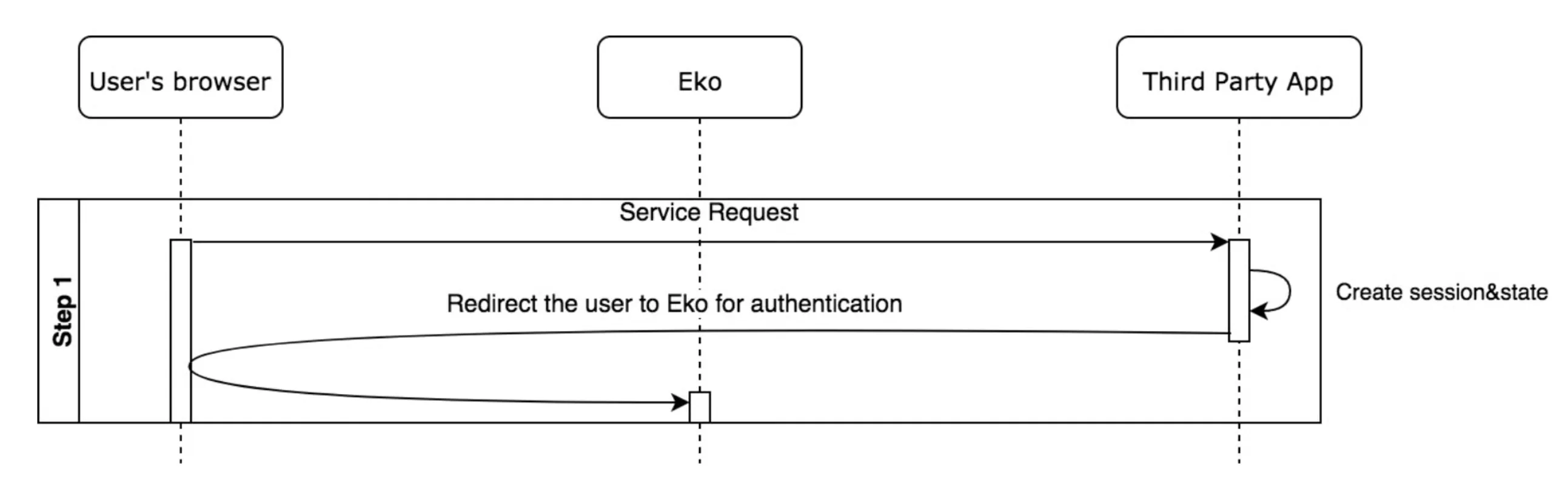
When a user sends an HTTP request to a third party app, the app must do two things
- The app must create a unique session token that holds the state between your app and the user’s client. You later match this unique session token with the authentication response (returned by the Eko Auth) to verify that the user is making the request and not a malicious attacker. These tokens are often referred to as cross-site request forgery (CSRF) tokens (One good choice for a state token is a string of 30 or so characters constructed using a high-quality random-number generator)
- The app then redirect the user to Eko Auth endpoint obtained after the registration. The parameters described must be passed along with the HTTP request.
Example of HTTP request
Section titled “Example of HTTP request”GET https://server.example.com/oauth/authorize? response_type=code &client_id=s6BhdRkqt3 &redirect_uri=https://client.example.com/cb &scope=openid profile &state=af0ifjsldkjParameter description
| Name | Description |
|---|---|
| response_type | This value must be “code” |
| client_id | The value Eko generated during registration |
| scope | The scope can be “openid” or “openid profile” If scope is set to “openid”, then the id_token will contain only the iss, sub, aud, exp, firstname, lastname, email and iat claims. If scope is set to “openid profile”, then the id_token will contain only the iss, sub, aud, exp, name, email and iat claims and the access token can be used to get additional user information. |
| redirect_uri | Redirection URI to which the response will be sent. This URI must exactly match the registered one. |
| state | Opaque value used to maintain state between request and the callback. Typically, Cross-Site Request Forgery (CSRF, XSRF) mitigation is done by cryptographically binding the value of this parameter with a browser cookie. |
Step 2 - Obtain authentication code from Eko
Section titled “Step 2 - Obtain authentication code from Eko”After Eko Auth receives the request with parameters from the browser, it will do as follows
- Eko Auth verifies the session cookie. (Actually, we must prompt the user to log in if he is not, but we assumed that the user is already logged in)
- Eko Auth verifies the “redirect_uri” which must match the one given to Eko in the registration step. The “client_id” must be valid. The “response_type” must be “code”. The “scope” must contain “openid” or “openid profile”. Other unknown parameter must be ignored. You will received a return error response if these conditions are not valid.
- Eko Auth generates an authentication code and redirect Eko App to the “redirect_uri” along with that “code”.
After the app receives the “code” and “state” from Eko Auth, it must verify that the state in user’s session or cookie matches with the state received from Eko Auth. This mechanism is used to prevent CSRF.
Example of HTTP request
GET https://client.example.org/cb? code=SplxlOBeZQQYbYS6WxSbIA &state=af0ifjsldkjParameter description
| Name | Description |
|---|---|
| code | The code is the value redirect via user’s browser to the third party app. It is used to derive id_token and access_token from Eko Auth. |
| state | Opaque value used to maintain state between the request and the callback. Typically, Cross-Site Request Forgery (CSRF, XSRF) mitigation is done by cryptographically binding the value of this parameter with a browser cookie. |
Step 3 - Request tokens using authentication code
Section titled “Step 3 - Request tokens using authentication code”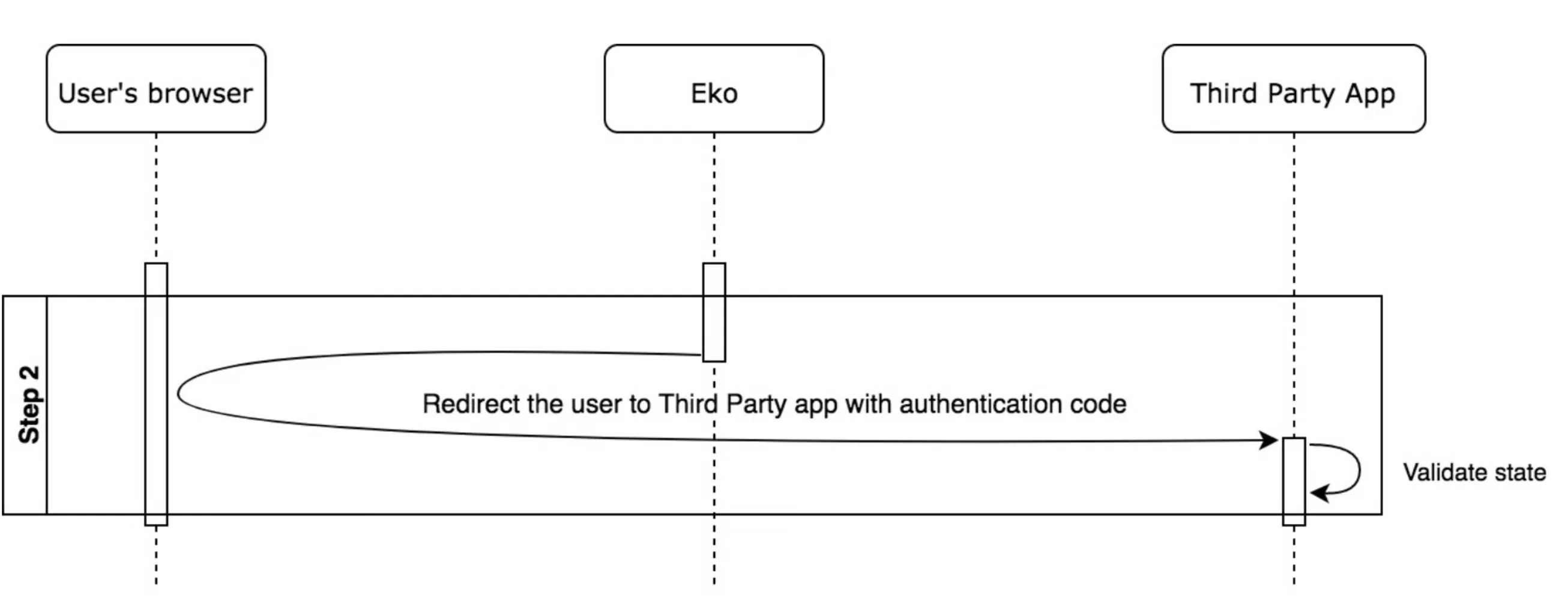
The third-party app uses the “code” to derive an “access token” by sending a request to Eko Auth. The third-party app must authenticate to the Eko Auth using the HTTP Basic method. Attach an ‘Authorization’ header as described in HTTP Basic Authentication and OAuth 2.0 section 2.3.1. Briefly, the encoded string is derived from base64(client_id + “:” + client_secret).
Example of HTTP request
curl -X POST \ https://server.example.com/oauth/token \ -H 'Authorization: Basic czZCaGRSa3F0MzpnWDFmQmF0M2JW' \ -H 'Content-Type: application/x-www-form-urlencoded' \ -d 'grant_type=authorization_code&code=SplxlOBeZQQYbYS6WxSbIA&redirect_uri=https%3A%2F%2Fclient.example.com%2Fcb'Parameter Description
| Name | Description |
|---|---|
| grant_type | The value must be “authorization_code” |
| code | The received authentication code. |
| redirect_uri | This URI must exactly match the registered one. |
After Eko Auth receives the request from the third-party app, it will
- Verify the authorization header (client_id & client_secret).
- Verify the “redirect_uri”. It must match the one during registration.
- Verify the “grant_type” which must be “authorization_code”.
- Verify the “code”. If the authentication code is found in the database, the response to the third-party app will be the following specification.
Example of HTTP response
Content-Type: application/jsonCache-Control: no-cache, no-storePragma: no-cache
{   "access_token":"SlAV32hkKG",   "token_type":"Bearer",   "expires_in":3600,   "refresh_token":"tGzv3JOkF0XG5Qx2TlKWIA",   "scope": "openid profile",   "id_token":"eyJ0 ... NiJ9.eyJ1c ...               I6IjIifX0.DeWt4Qu ... ZXso"}
Parameter description
| Name | Description |
|---|---|
| access_token | A string which will be consumed by the client to access a variety of Eko APIs (default expiration time is 1 hour) |
| token_type | The value must be “Bearer” |
| id_token | A JWT token which represent user identity. Please refer to its specification in next section. |
| expires_in | Expiration time of access token in seconds |
ID Token
The ID Token is a security token that contains claims about the authentication of a user by Eko Auth when using a Client, and potentially other requested Claims. The ID Token is represented as a JWT. This link provides a good tutorial on how to create one using JWT format. The ID Token is signed with client secret and will expire in one hour.
If scope is set to “openid”
{ "sub": "24400320", "iss": "https://server.example.com", "aud": "s6BhdRkqt3", "exp": 1311281970, "iat": 1311280970 "name": "David Zhang", "email": "[email protected]”}| Name | Description |
|---|---|
| sub | A unique identifier of the subject. In case of Eko, it is the user’s object id. |
| aud | Audience(s) that this ID Token is intended for. In this case, this is the client_id. (This value could be an array of client_id. Refer to the official for more detail.) |
| exp | An expiration UNIX timestamp of this id token |
| iat | Issued at. A UNIX timestamp when this id token is created. |
| iss | Issuer Identifier for the Issuer of the response. In this case, it must be Eko Auth url. |
| firstname | Firstname of the subject |
| Email of the subject | |
| lastname | Lastname of the subject |
After the third-party app receives the response from Eko Auth, it should
- Decode the ID token
- The third-party app does not have to verify the signature of the received ID token as it can be confident that it is communicating with Eko’s server directly. However, an ID token signature can be verified by using client secret.
- The third-party app must verify the ID token claims.
- “iss” must be matched with the Eko Auth url.
- “aud” must be the third-party app’s client_id.
- “exp” must be larger than current UNIX timestamp value.
- If “iat” is too old, the third-party app can reject this token. To decide how old the token should be rejected is depended on the app itself.
- The third-party app can now consume the ID token and access token. The use of access token will not be covered in this document.
- The third-party app can now allow users to access the service.
Step 4 - Get user profile using access token (Optional)
Section titled “Step 4 - Get user profile using access token (Optional)”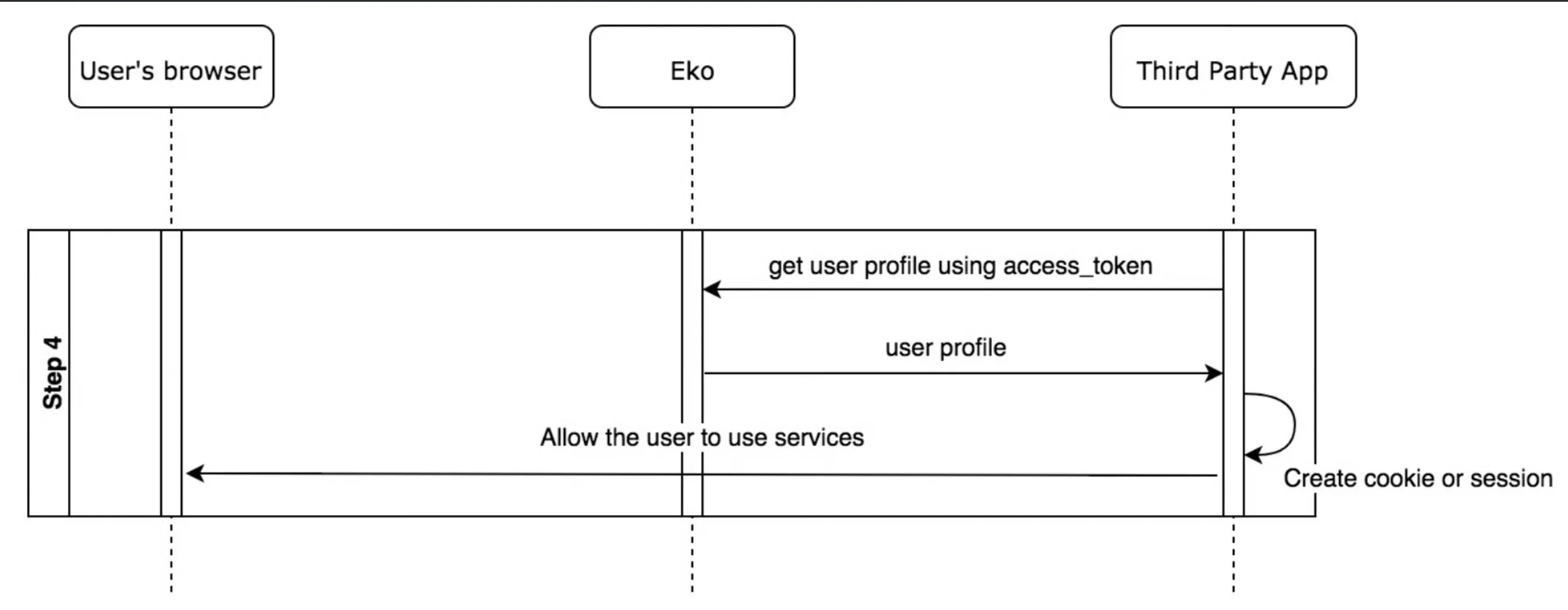
In case the third party app needs to get more user information such as user profile, it can send an HTTP request with an access token in the Authorization Header to Eko Auth to get the user information.
Example of HTTP request
curl -X GET \ https://server.example.com/userinfo \ -H 'Authorization: Bearer SlAV32hkKG' \Eko Auth verifies the access token, if valid, then returns additional information to the third party app in JSON format. The following is an example of returned value. The returned fields might vary depending on the profile information of users.
| Name | Description |
|---|---|
| Authorization | Bearer “access_token” |
Example of HTTP response body in JSON format
{ "_id": "5d2e93a37995a01c35c3d42b", "nid": "5d2c2a2d5a5898bedb542075", "network_admin": admin01, "username": "user01", "firstname": "David", "lastname": "Zhang", "email": "[email protected]", "avatar": "207a531ae1de4e0ga5f89c6d831eczc5", "position": "", "status": "", "extras": {}}Parameter description
| Name | Description |
|---|---|
| sub | A unique identifier of the subject. In case of Eko, it is the user’s object id. |
| name | Full name of the subject |
| given_name | First name of the subject |
| family_name | Last name of the subject |
| preferred_username | Username of the subject |
| Email of the subject | |
| picture | Profile picture of the subject |
| title | Job title of the subject |
Getting profile picture
Section titled “Getting profile picture”We allow customer to view or download user profile picture on Eko.
https://customer-h1.ekoapp.com/file/view/avatar_id?size=large&access_token=6438e0cad5be0d61sf2a0576c9ed8p89ec763651Reference
- Eko OAuth 2.0 Phase 1 Specification
Was this page helpful?
Thank you for your feedback!