

Eko AD Sync refers to the integration solution provided by Amity Solutions that connects your organization’s on-premises user management system, typically Microsoft Active Directory, with the cloud-hosted Eko application.
1. Definition and Core Components
Section titled “1. Definition and Core Components”Eko Active Directory Connector (EkoADC) is Amity Solutions’ proprietary software designed specifically for user integration with Microsoft Active Directory. EkoADC is used for two primary functions: user synchronization and authentication.
EkoADC is configured to work with Active Directory or any other Lightweight Directory Access Protocol (LDAP) compatible identity management systems. It runs on a securely hardened Ubuntu image and can be installed either on-premise or on the cloud.
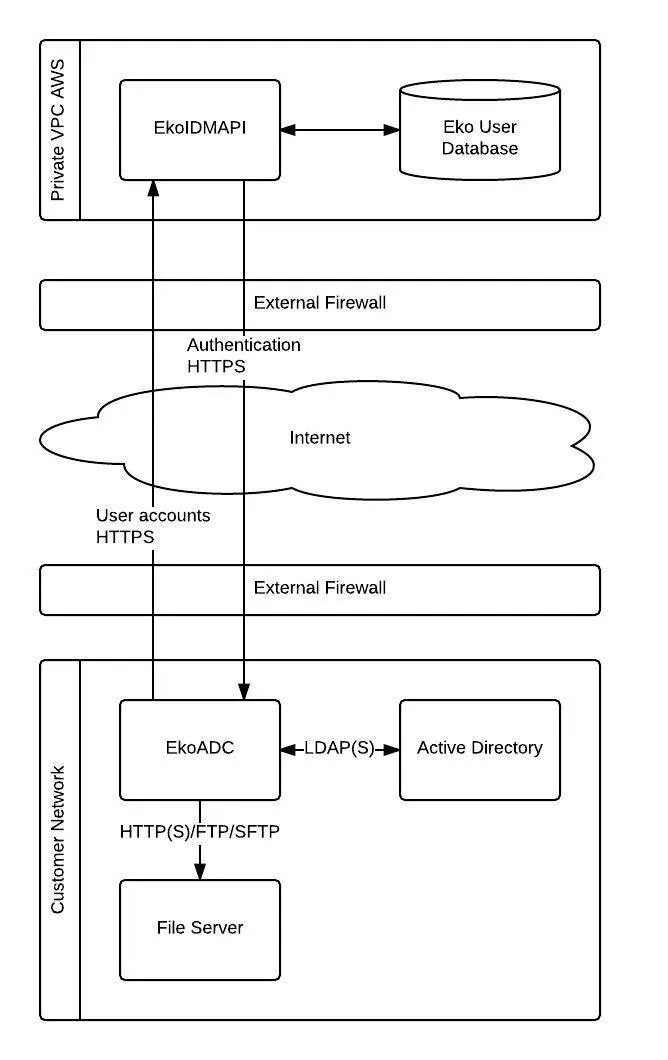
A secondary component involved in the process is the Eko Identity Management API (EkoIDMAPI), which is an Eko custom API that works in conjunction with EkoADC to integrate external user accounts.
2. Core Functionality
Section titled “2. Core Functionality”Eko AD Sync facilitates two crucial processes for managing users in the Eko app:
2.1 User Synchronization (Provisioning)
Section titled “2.1 User Synchronization (Provisioning)”User synchronization involves the creation, updating, and deletion of user accounts in Eko. EkoADC is responsible for fetching user data from the customer’s directory service, such as Active Directory, using the LDAP protocol.
Synchronization supports various provisioning actions, including:
- Insert, Update, Delete, Upsert, and Upload mass users.
- Disabling user accounts.
In addition to syncing directly from Active Directory, EkoADC also supports user synchronization from a source file, such as a Comma Separated Value (CSV) file from an HR system, typically delivered via FTP/SFTP. This file-based method is primarily recommended for updating user profiles, as user authentication still requires a directory software that supports LDAP.
The EkoADC also enables more advanced features, such as Avatar sync and a Password generator.
2.2 User Authentication
Section titled “2.2 User Authentication”EkoADC enables users to log into the Eko Application using the credentials stored in their Active Directory.
The authentication process works as follows:
- When a user logs into Eko, the user account information (username and password) is passed from the EkoIDMAPI to the EkoADC via HTTPS.
- Upon receiving the user account details, EkoADC performs an LDAP binding with the Active Directory for verification.
- If the user is successfully authenticated, EkoADC sends the result back to EkoIDMAPI.
3. Key Benefit
Section titled “3. Key Benefit”A significant benefit of implementing Eko AD Sync is that Eko automatically creates your company’s directory on the application, which removes the need to manually add coworkers. This ensures that user data, including associated information like group memberships, is automatically maintained and up-to-date across your organization and the Eko platform.
Was this page helpful?
Thank you for your feedback!