

How to Create a new assistant:
Section titled “How to Create a new assistant:”- Go to Eko Admin Panel, navigate to Assistant menu and add new Assistant
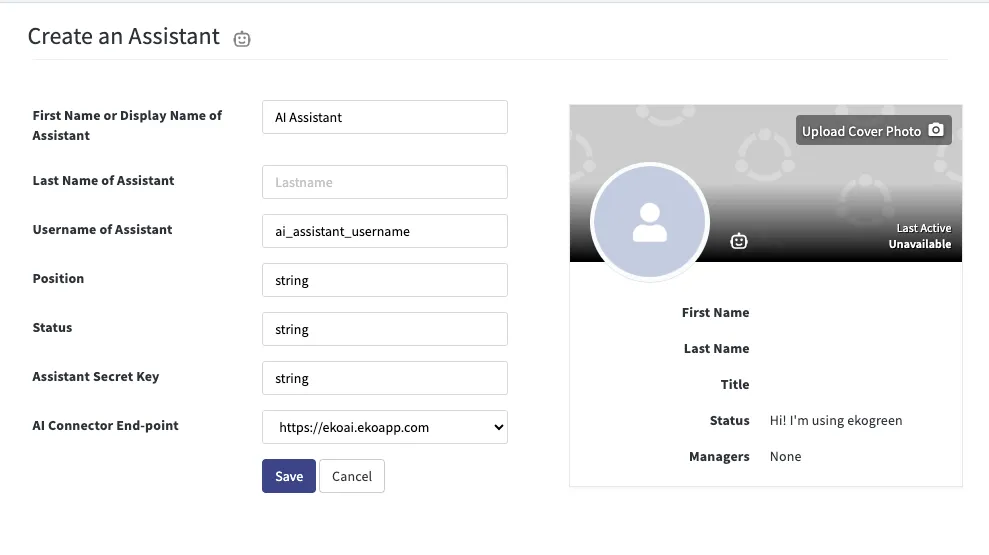
| Field | Mandatory | Type |
|---|---|---|
| Display Name | Yes | String |
| Last Name | No | String |
| Username of Assistant | Yes | String |
| Position | Yes | String |
| Status | Yes | String |
| Assistant Secret Key | Yes | String |
| AI Connector End-point | Yes | String |
Once the assistant is created from Eko Admin Panel, the system automatically create the agent in EkoAI system
Connect Assistant with External AI
Section titled “Connect Assistant with External AI”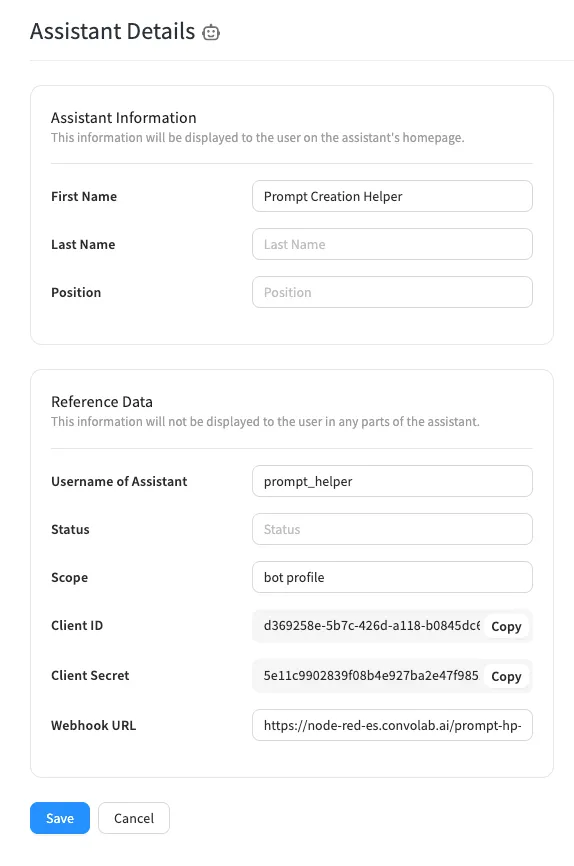
If you provide your own webhook URL, the system will send events to that webhook and wait for a response from your AI engine.
How It Works
Section titled “How It Works”- Event Delivery – Each publish action triggers an event, which is sent to the webhook URL you configure.
- AI Engine Response – Your AI engine must process the event and respond according to the required specification.
- System Continuation – The system will proceed based on the response returned by your AI engine.
Was this page helpful?
Thank you for your feedback!